


Confluence connector
OAuth 2.0 Project ManagementFiles & DocumentsCollaborationConnect to Confluence. Manage spaces, pages, content, and team collaboration
Confluence connector
-
Install the SDK
Section titled “Install the SDK”Terminal window npm install @scalekit-sdk/nodeTerminal window pip install scalekit -
Set your credentials
Section titled “Set your credentials”Add your Scalekit credentials to your
.envfile. Find values in app.scalekit.com > Developers > API Credentials..env SCALEKIT_ENVIRONMENT_URL=<your-environment-url>SCALEKIT_CLIENT_ID=<your-client-id>SCALEKIT_CLIENT_SECRET=<your-client-secret> -
Set up the connector
Section titled “Set up the connector”Register your Confluence credentials with Scalekit so it handles the token lifecycle. You do this once per environment.
Dashboard setup steps
Register your Scalekit environment with the Confluence connector so Scalekit handles the authentication flow and token lifecycle for you. The connection name you create will be used to identify and invoke the connection programmatically. Then complete the configuration in your application as follows:
-
Set up auth redirects
-
In Scalekit dashboard, go to AgentKit > Connections > Create Connection. Find Confluence and click Create. Copy the redirect URI. It looks like
https://<SCALEKIT_ENVIRONMENT_URL>/sso/v1/oauth/<CONNECTION_ID>/callback.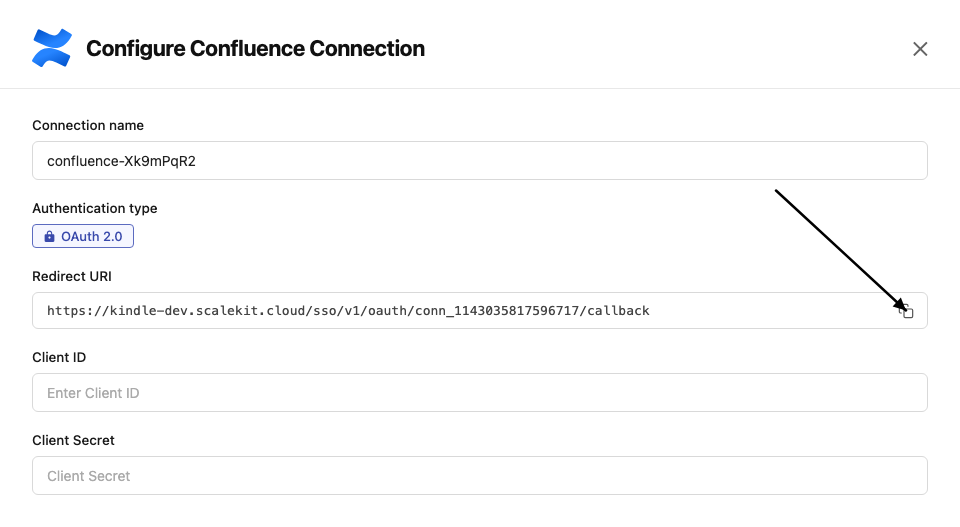
-
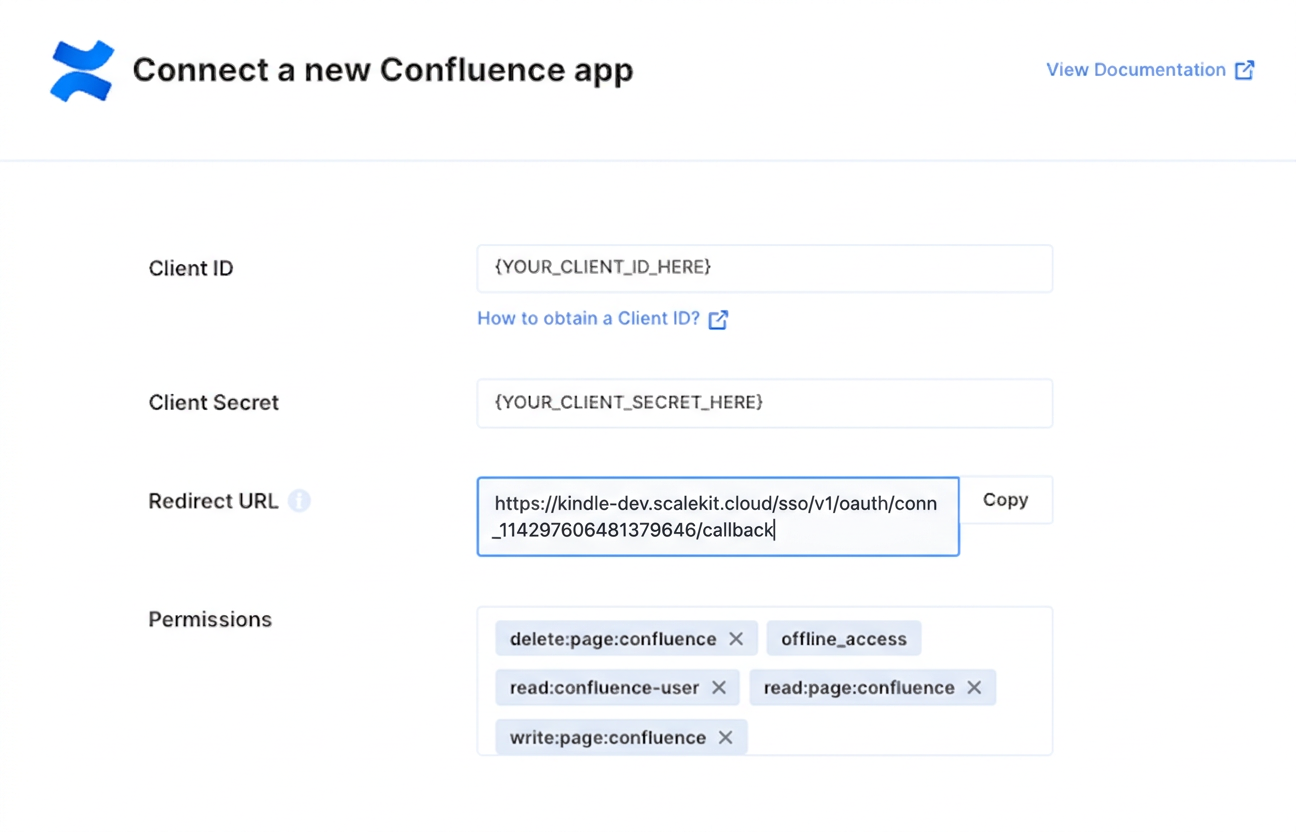
In the Atlassian Developer Console, open your app and go to Authorization → OAuth 2.0 (3LO) → Configure.
-
Paste the copied URI into the Callback URL field and click Save changes.
-
-
Get client credentials
In the Atlassian Developer Console, open your app and go to Settings:
- Client ID — listed under Client ID
- Client Secret — listed under Secret
-
Add credentials in Scalekit
-
In Scalekit dashboard, go to AgentKit > Connections and open the connection you created.
-
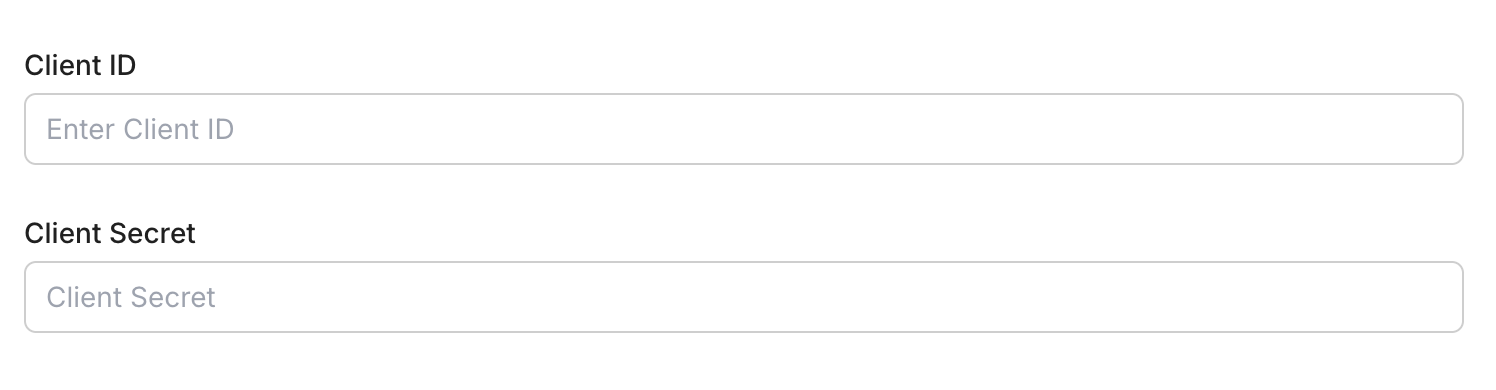
Enter your credentials:
- Client ID (from your Atlassian app settings)
- Client Secret (from your Atlassian app settings)
- Permissions (scopes — see Confluence OAuth scopes reference)
-
Click Save.
-
-
-
Authorize and make your first call
Section titled “Authorize and make your first call”quickstart.ts import { ScalekitClient } from '@scalekit-sdk/node'import 'dotenv/config'const scalekit = new ScalekitClient(process.env.SCALEKIT_ENV_URL,process.env.SCALEKIT_CLIENT_ID,process.env.SCALEKIT_CLIENT_SECRET,)const actions = scalekit.actionsconst connector = 'confluence'const identifier = 'user_123'// Generate an authorization link for the userconst { link } = await actions.getAuthorizationLink({ connectionName: connector, identifier })console.log('Authorize Confluence:', link)process.stdout.write('Press Enter after authorizing...')await new Promise(r => process.stdin.once('data', r))// Make your first callconst result = await actions.executeTool({connector,identifier,toolName: 'confluence_blogpost_list',toolInput: {},})console.log(result)quickstart.py import osfrom scalekit.client import ScalekitClientfrom dotenv import load_dotenvload_dotenv()scalekit_client = ScalekitClient(env_url=os.getenv("SCALEKIT_ENV_URL"),client_id=os.getenv("SCALEKIT_CLIENT_ID"),client_secret=os.getenv("SCALEKIT_CLIENT_SECRET"),)actions = scalekit_client.actionsconnection_name = "confluence"identifier = "user_123"# Generate an authorization link for the userlink_response = actions.get_authorization_link(connection_name=connection_name,identifier=identifier,)print("Authorize Confluence:", link_response.link)input("Press Enter after authorizing...")# Make your first callresult = actions.execute_tool(tool_input={},tool_name="confluence_blogpost_list",connection_name=connection_name,identifier=identifier,)print(result)
What you can do
Section titled “What you can do”Connect this agent connector to let your agent:
- Create blogpost, footer comment, page — Create a new blog post in a Confluence space
- Get blogpost, footer comments, page attachments — Retrieve a specific Confluence blog post by its ID
- List blogpost, page, space — List blog posts in Confluence
- Delete page — Delete a Confluence page by its ID
- Update page — Update an existing Confluence page
- Search records — Search Confluence content using Confluence Query Language (CQL)
Common workflows
Section titled “Common workflows”Proxy API call
Don’t worry about the Confluence cloud ID in the path. Scalekit automatically resolves {{cloud_id}} from the connected account’s configuration. For example, a request with path="/wiki/rest/api/user/current" will be sent to https://api.atlassian.com/ex/confluence/a1b2c3d4-e5f6-7890-abcd-ef1234567890/wiki/rest/api/user/current automatically.
const result = await actions.request({ connectionName: 'confluence', identifier: 'user_123', path: '/wiki/rest/api/user/current', method: 'GET',});console.log(result);result = actions.request( connection_name='confluence', identifier='user_123', path="/wiki/rest/api/user/current", method="GET")print(result)Execute a tool
const result = await actions.executeTool({ connector: 'confluence', identifier: 'user_123', toolName: 'confluence_list', toolInput: {},});console.log(result);result = actions.execute_tool( tool_input={}, tool_name='confluence_list', connection_name='confluence', identifier='user_123',)print(result)Tool list
Section titled “Tool list”Use the exact tool names from the Tool list below when you call execute_tool. If you’re not sure which name to use, list the tools available for the current user first.
confluence_blogpost_create
#
Create a new blog post in a Confluence space. Requires a target space ID and a title. Optionally set the status (published or draft) and provide body content in storage or atlas_doc_format representation. Set the private query parameter to restrict visibility. 6 params
Create a new blog post in a Confluence space. Requires a target space ID and a title. Optionally set the status (published or draft) and provide body content in storage or atlas_doc_format representation. Set the private query parameter to restrict visibility.
spaceId string required The ID of the space to create the blog post in title string required Title of the blog post body_representation string optional Storage format of the body content body_value string optional The content of the blog post body private boolean optional Whether to create the blog post as private status string optional Publication status of the blog post confluence_blogpost_get
#
Retrieve a specific Confluence blog post by its ID. Returns the blog post content, metadata, author, space, status, and version history. Optionally include body content in a specified format, fetch a draft version, or a historical version. 5 params
Retrieve a specific Confluence blog post by its ID. Returns the blog post content, metadata, author, space, status, and version history. Optionally include body content in a specified format, fetch a draft version, or a historical version.
id string required The numeric ID of the blog post to retrieve body_format string optional Format of the blog post body to include in the response get_draft boolean optional Whether to retrieve the draft version of the blog post include_labels boolean optional Whether to include labels applied to the blog post version integer optional Version number of the blog post to retrieve confluence_blogpost_list
#
List blog posts in Confluence. Filter by blog post IDs, space IDs, sort order, status, title, or body format. Returns paginated results with cursor-based navigation. 8 params
List blog posts in Confluence. Filter by blog post IDs, space IDs, sort order, status, title, or body format. Returns paginated results with cursor-based navigation.
body_format string optional Format of the blog post body to return cursor string optional Cursor token for fetching the next page of results id array optional Filter by specific blog post IDs limit integer optional Maximum number of blog posts to return per page sort string optional Sort order for the results space_id array optional Filter blog posts by space IDs status string optional Filter blog posts by status title string optional Filter blog posts by title (partial match) confluence_page_attachments_get
#
Retrieve all attachments on a Confluence page. Returns a paginated list of attachments with metadata including filename, media type, file size, and download URL. Supports filtering by media type or filename and cursor-based pagination. 6 params
Retrieve all attachments on a Confluence page. Returns a paginated list of attachments with metadata including filename, media type, file size, and download URL. Supports filtering by media type or filename and cursor-based pagination.
id string required The ID of the page whose attachments to retrieve cursor string optional Cursor token for pagination, returned in the previous response as _links.next filename string optional Filter attachments by exact filename limit integer optional Maximum number of attachments to return per page (default 25, max 250) media_type string optional Filter attachments by MIME media type (e.g. image/png, application/pdf) sort string optional Sort order for attachments (e.g. created-date, -created-date, modified-date, -modified-date) confluence_page_children_get
#
Retrieve the direct child pages of a given Confluence page. Returns a paginated list of child pages with their IDs, titles, and statuses. Use cursor-based pagination to iterate through large result sets. 4 params
Retrieve the direct child pages of a given Confluence page. Returns a paginated list of child pages with their IDs, titles, and statuses. Use cursor-based pagination to iterate through large result sets.
id string required The ID of the parent page whose children to retrieve cursor string optional Cursor token for pagination, returned in the previous response as _links.next limit integer optional Maximum number of child pages to return (default 25, max 250) sort string optional Sort order for child pages (e.g. -modified-date, id, title, -title) confluence_page_create
#
Create a new Confluence page in a specified space. Requires a space ID and title. Optionally set the initial status (current for published, draft for unpublished), a parent page, and body content. The body requires both body_representation and body_value to be provided together. 8 params
Create a new Confluence page in a specified space. Requires a space ID and title. Optionally set the initial status (current for published, draft for unpublished), a parent page, and body content. The body requires both body_representation and body_value to be provided together.
spaceId string required The ID of the space in which to create the page title string required Title of the new page body_representation string optional The markup format for the page body (e.g. storage, atlas_doc_format). Must be set together with body_value. body_value string optional The raw content of the page body in the format specified by body_representation. Must be set together with body_representation. parentId string optional ID of the parent page under which this page will be created private boolean optional Set to true to create the page as a private page visible only to the creator root_level boolean optional Set to true to create the page at the root level of the space (no parent) status string optional Initial status of the page: current (published) or draft (unpublished) confluence_page_delete
#
Delete a Confluence page by its ID. By default moves the page to the trash; set purge=true to permanently delete without recovery. Set draft=true to delete a draft version instead of the published page. This action is irreversible when purge is enabled. 3 params
Delete a Confluence page by its ID. By default moves the page to the trash; set purge=true to permanently delete without recovery. Set draft=true to delete a draft version instead of the published page. This action is irreversible when purge is enabled.
id string required The ID of the page to delete draft boolean optional Set to true to delete the draft version of the page rather than the published version purge boolean optional Set to true to permanently delete the page, bypassing the trash confluence_page_get
#
Retrieve a single Confluence page by its ID. Returns the page title, status, version, space, and optionally the full body content. Use body_format to control the markup format returned. Additional flags expose labels, properties, and version history. 7 params
Retrieve a single Confluence page by its ID. Returns the page title, status, version, space, and optionally the full body content. Use body_format to control the markup format returned. Additional flags expose labels, properties, and version history.
id string required The ID of the page to retrieve body_format string optional Format for the returned page body (e.g. storage, atlas_doc_format, anonymous_export_view) get_draft boolean optional Set to true to retrieve the draft version of the page instead of the published version include_labels boolean optional Set to true to include labels attached to the page in the response include_properties boolean optional Set to true to include content properties attached to the page include_version boolean optional Set to true to include full version details in the response version integer optional Specific version number of the page to retrieve (defaults to latest) confluence_page_labels_get
#
Retrieve all labels attached to a Confluence page. Labels can be filtered by prefix (e.g. global, my, team). Returns a paginated list of label names and prefixes. Use cursor-based pagination for pages with many labels. 5 params
Retrieve all labels attached to a Confluence page. Labels can be filtered by prefix (e.g. global, my, team). Returns a paginated list of label names and prefixes. Use cursor-based pagination for pages with many labels.
id string required The ID of the page whose labels to retrieve cursor string optional Cursor token for pagination, returned in the previous response as _links.next limit integer optional Maximum number of labels to return per page (default 25, max 250) prefix string optional Filter labels by prefix (e.g. global, my, team, system) sort string optional Sort order for labels (e.g. created-date, -created-date, name, -name) confluence_page_list
#
List Confluence pages with optional filtering by space, status, title, or page IDs. Returns a paginated collection of pages. Use the cursor parameter to fetch subsequent pages. Supports body format selection for inline content retrieval. 8 params
List Confluence pages with optional filtering by space, status, title, or page IDs. Returns a paginated collection of pages. Use the cursor parameter to fetch subsequent pages. Supports body format selection for inline content retrieval.
body_format string optional The content format to return for page bodies (e.g. storage, atlas_doc_format, anonymous_export_view) cursor string optional Cursor token for pagination, returned in previous response as _links.next id string optional Filter by one or more page IDs (comma-separated or repeated query param) limit integer optional Maximum number of pages to return per page (default 25, max 250) sort string optional Sort order for results (e.g. -modified-date, id, title, -title) space_id string optional Filter by one or more space IDs (comma-separated) status string optional Filter pages by status (e.g. current, archived, deleted, trashed) title string optional Filter pages by title (exact match) confluence_page_update
#
Update an existing Confluence page. Requires the page ID, current status, title, and the next version number (must be exactly current version + 1). Optionally update the page body, change the parent, or add a version message. Retrieve the current version number with the Get Page tool before calling this. 8 params
Update an existing Confluence page. Requires the page ID, current status, title, and the next version number (must be exactly current version + 1). Optionally update the page body, change the parent, or add a version message. Retrieve the current version number with the Get Page tool before calling this.
id string required The ID of the page to update status string required Status of the page after the update (e.g. current, draft) title string required Updated title of the page version_number integer required The new version number for this update. Must be exactly the current version number plus 1. body_representation string optional Format for the updated body content (e.g. storage, atlas_doc_format). Must be set together with body_value. body_value string optional The updated body content in the format specified by body_representation. Must be set together with body_representation. parentId string optional ID of the new parent page (to move the page in the hierarchy) version_message string optional Optional message describing what changed in this version confluence_search
#
Search Confluence content using Confluence Query Language (CQL). CQL is a powerful structured query language for finding pages, blog posts, spaces, attachments, and comments. Returns matching content with metadata including title, space, author, and last modified date. 5 params
Search Confluence content using Confluence Query Language (CQL). CQL is a powerful structured query language for finding pages, blog posts, spaces, attachments, and comments. Returns matching content with metadata including title, space, author, and last modified date.
cql string required Confluence Query Language (CQL) query string cursor string optional Cursor token for fetching the next page of results excerpt string optional Controls excerpt handling in search results expand string optional Comma-separated list of properties to expand in results limit integer optional Maximum number of results to return confluence_space_get
#
Retrieve details of a specific Confluence space by its ID. Returns space metadata including key, name, type, status, description, homepage, and permissions. Optionally include the space icon and labels. 4 params
Retrieve details of a specific Confluence space by its ID. Returns space metadata including key, name, type, status, description, homepage, and permissions. Optionally include the space icon and labels.
id string required The numeric ID of the space to retrieve description_format string optional Format for the space description in the response include_icon boolean optional Whether to include the space icon in the response include_labels boolean optional Whether to include labels applied to the space confluence_space_list
#
List Confluence spaces accessible to the authenticated user. Supports filtering by space IDs, keys, type (global or personal), status (current or archived), and labels. Returns paginated results with cursor-based navigation. 9 params
List Confluence spaces accessible to the authenticated user. Supports filtering by space IDs, keys, type (global or personal), status (current or archived), and labels. Returns paginated results with cursor-based navigation.
cursor string optional Cursor token for fetching the next page of results description_format string optional Format for the space description in the response ids array optional Filter spaces by their numeric IDs keys array optional Filter spaces by their space keys labels array optional Filter spaces by labels limit integer optional Maximum number of spaces to return per page sort string optional Sort order for the results status string optional Filter spaces by status type string optional Filter spaces by type